Alpha Emulation: A Quick Summary
Alpha-Emulation:
Emulación Alpha: Un resumen rápido
Emulation Alpha: Un bref aperçu
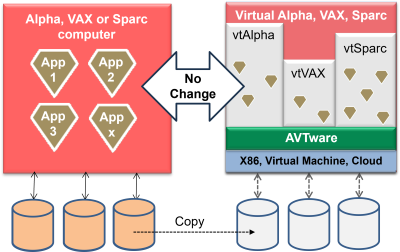
vtAlpha allows the owners of Alpha computer systems to move their entire Alpha software installation to a more modern environment (X86 computer, Virtual Machine or Cloud) without software changes.
No changes ➜ no problems.
Just copy your disk content to the new host and continue your operation as you are used to. It really is that simple.
| AlphaStation 200, 250 AlphaServer 300, 400 |
➜ | vtAlpha-AS (Alpha Start) |
| AlphaServer 1000 AlphaStation 500, 600 XP900, XP1000 |
➜ | vtAlpha-BS (Basic System) |
| AlphaServer 2000, 2100 AlphaServer 4000, 4100 |
➜ | vtAlpha-CS (Classic System) |
| AlphaServer DS20, DS25 AlphaServer 1200 |
➜ | vtAlpha-DS (DS System) |
| AlphaServer ES40, ES45, ES47 | ➜ | vtAlpha-ES (ES System) |
| AlphaServer ES80, GS80, GS160, GS320, GS1280 |
➜ | vtAlpha-GS (GS System) |
OpenVMS or Tru64 directly on X86 computer, Virtual Machine or Cloud.
By creating the exact Alpha hardware environment as the original system, vtAlpha allows to run all OpenVMS or Tru64 software without changes on a modern compute platform. The Operating System does not change, the applications do not change, nor does the database technology that is used or the procedures that have been put in place. Upgrade to newer hardware without changing your existing applications!
Six vtAlpha variants are available to cover the whole range of Alpha systems that were manufactured during its life-time.
vtAlpha-AS (Alpha Start) and vtAlpha-BS (Basic Systems) are designed to replace single CPU AlphaServer or AlphaStation systems. vtAlpha-AS is the entry-level product meant to replace the earliest Alpha workstations and servers that were equipped the first generation Alpha processors. vtAlpha-AS runs less fast than vtAlpha-BS and offers less PCI-slots, much like the original systems. The other vtAlpha products can replace multi-CPU AlphaServers, each having a different (virtual) backplane to meet the requirements of the systems in each group.
Click on the section showing the Alpha product you like to replace to find more information about the solution.
Quick Transition Process:
- Install vtAlpha on a host system;
- Make a virtual equivalent of the Alpha;
- Copy the content of your Alpha disks;
- Continue your operation as before.
AVTware solutions are trusted by many.


Dig deeper:
Schneller Übergangsprozess:
- Installieren Sie vtAlpha auf einem Hostsystem.
- Machen Sie ein virtuelles Äquivalent des Alphas.
- Kopieren Sie den Inhalt Ihrer Alpha-Festplatten.
- Setzen Sie Ihre Operation wie zuvor fort.
Proceso de transición ráida:
- Instale vtAlpha en un sistema host;
- Hacer un equivalente virtual de la Alpha;
- Copia el contenido de tus discos Alpha;
- Continúa tu operación como antes.
Aperçu du processus de transition:
- Installer vtAlpha sur une machine hôte;
- Créez l'équivalent virtuel de votre machine Alpha;
- Copiez le contenu de vos disque Alpha;
- Procédez pour le reste comme d'habitude


 Français
 Deutsch
 Español

